
We are excited to announce the release of MiraBot Firmware 1.3.0.
This update makes MiraBot easier to connect, easier to configure, and more convenient for VR and SLR users.
What’s New
1. Wi-Fi and Bluetooth LE in One Firmware
MiraBot now supports both Wi-Fi and Bluetooth LE in the same firmware.
You no longer need to flash different firmware versions to switch between Wi-Fi and Bluetooth. Simply connect your device by USB, open MiraPlay Web, and change the wireless mode in Wireless Setting.
*Please note that Wi-Fi and Bluetooth LE cannot be active at the same time. Only one wireless mode can be used at once.
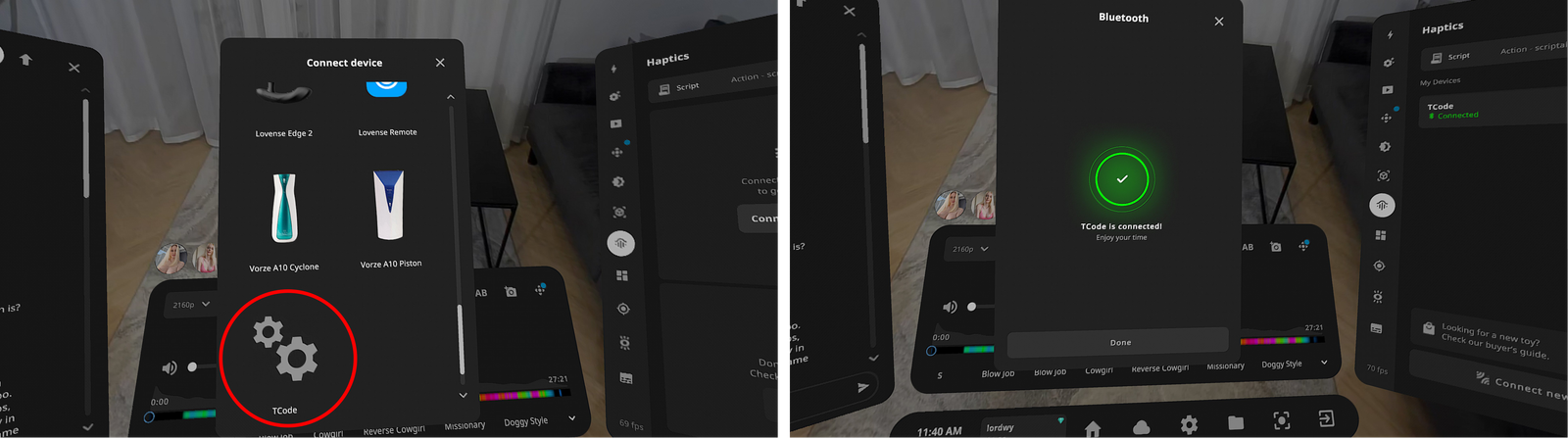
2. Direct SLR / DeoVR Bluetooth Connection
Firmware 1.3.0 also adds SLR-Compatible Bluetooth Mode.
When this mode is enabled, MiraBot S6 / Lite can connect through Bluetooth LE using the SLR-compatible mode. This makes it easier to use MiraBot with supported SexLikeReal / DeoVR environments, including:
- DeoVR on Quest
- SexLikeReal on PC browser
- Haptics Connect on Smartphone
Why This Update Matters
This update was built around feedback from MiraBot users.
Many users wanted a simpler way to switch between Wi-Fi and Bluetooth, and many SLR / DeoVR users wanted a more direct connection experience without complicated bridge setups.
Firmware 1.3.0 helps reduce those barriers.
For existing MiraBot users, this is a free upgrade that makes your device more flexible.
For new users, MiraBot is now easier to set up and easier to use with popular VR playback workflows.
How to Update
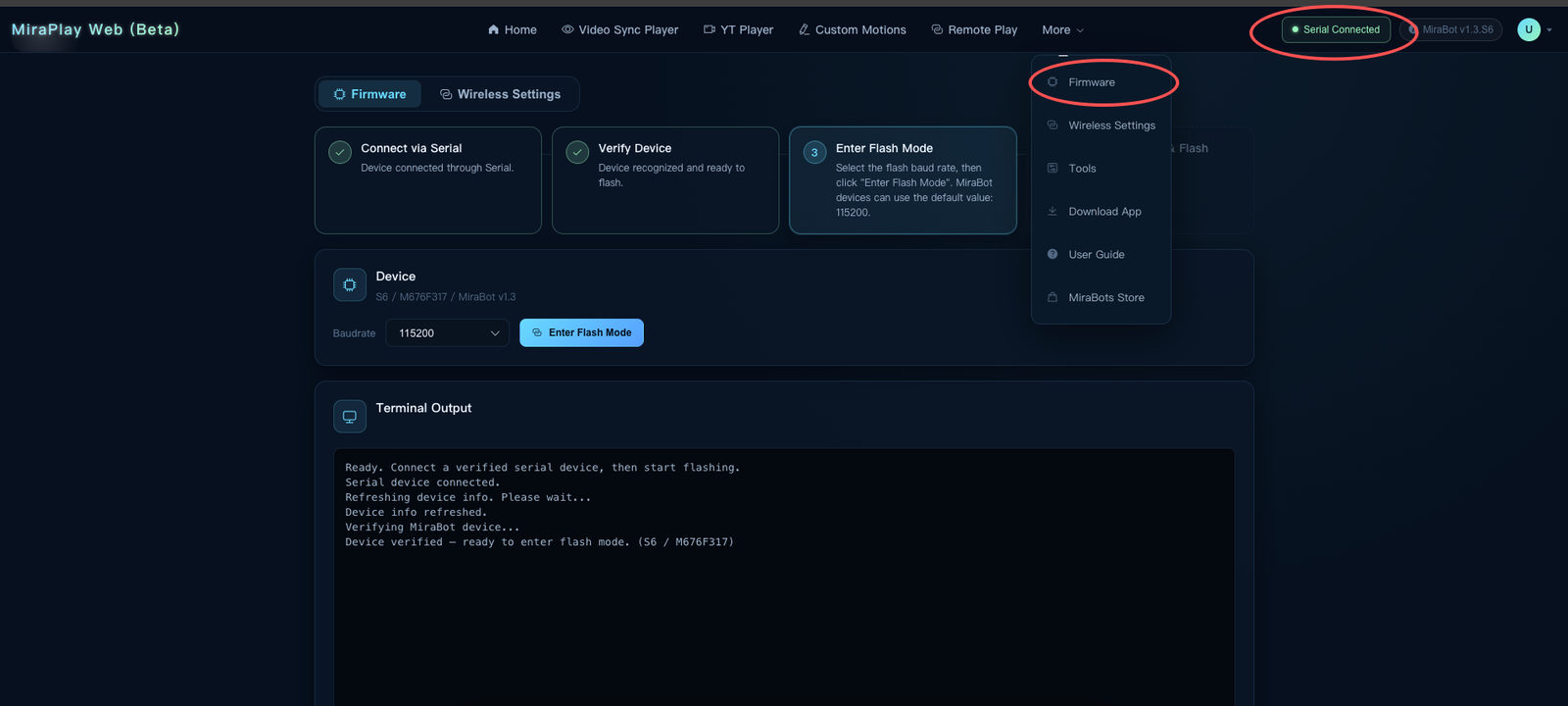
You can update your MiraBot through MiraPlay Web.
After logging in, connect your MiraBot to your computer with a USB cable,open the upper-right menu and go to Firmware Update,and follow the on-screen instructions to update the firmware.
FAQ
Q1.What is the default wireless mode?
MiraBot uses Wi-Fi mode by default.
You can switch to Bluetooth LE in MiraPlay Web > Wireless Setting under cable connect.
Q2.Do previous MiraBot devices support this update?
Yes. Previously purchased MiraBot S6 and MiraBot Lite devices support Firmware 1.3.0.
Q3.Can third-party OSR devices flash this firmware?
No. MiraBot Firmware 1.3.0 is currently only available for MiraBot devices.
Third-party OSR devices can still use MiraPlay AiO or MiraPlay Web through USB or Wi-Fi if their current firmware supports it.
Q4.Why can’t MiraPlay AiO connect by Bluetooth after the update?
Please make sure you are using MiraPlay AiO v1.7.6 or later.
Also check that your MiraBot is set to Bluetooth LE mode. If it is still in Wi-Fi mode, it will not appear as a Bluetooth LE device.
A Better Connection Experience
Firmware 1.3.0 is an important step toward making MiraBot simpler and more user-friendly.
With easier wireless switching and direct SLR / DeoVR Bluetooth compatibility, MiraBot is now more convenient for both existing users and new users exploring multi-axis playback.