
MiraPlay continues to improve the VR experience for MiraBot users.
With the latest updates to MiraPlay Web and MiraPlay AiO v1.7.5, users can now enjoy a smoother VR video workflow, including VR video playback with funscript sync, Device Bridge connection, and improved VR controls for phone-based VR setups.
This update is especially useful for users who want to use MiraBot with VR videos in browser-based or mobile VR environments.
VR Immersive Mode in MiraPlay Web
The Video Sync Player in MiraPlay Web now includes a new VR Immersive Mode.
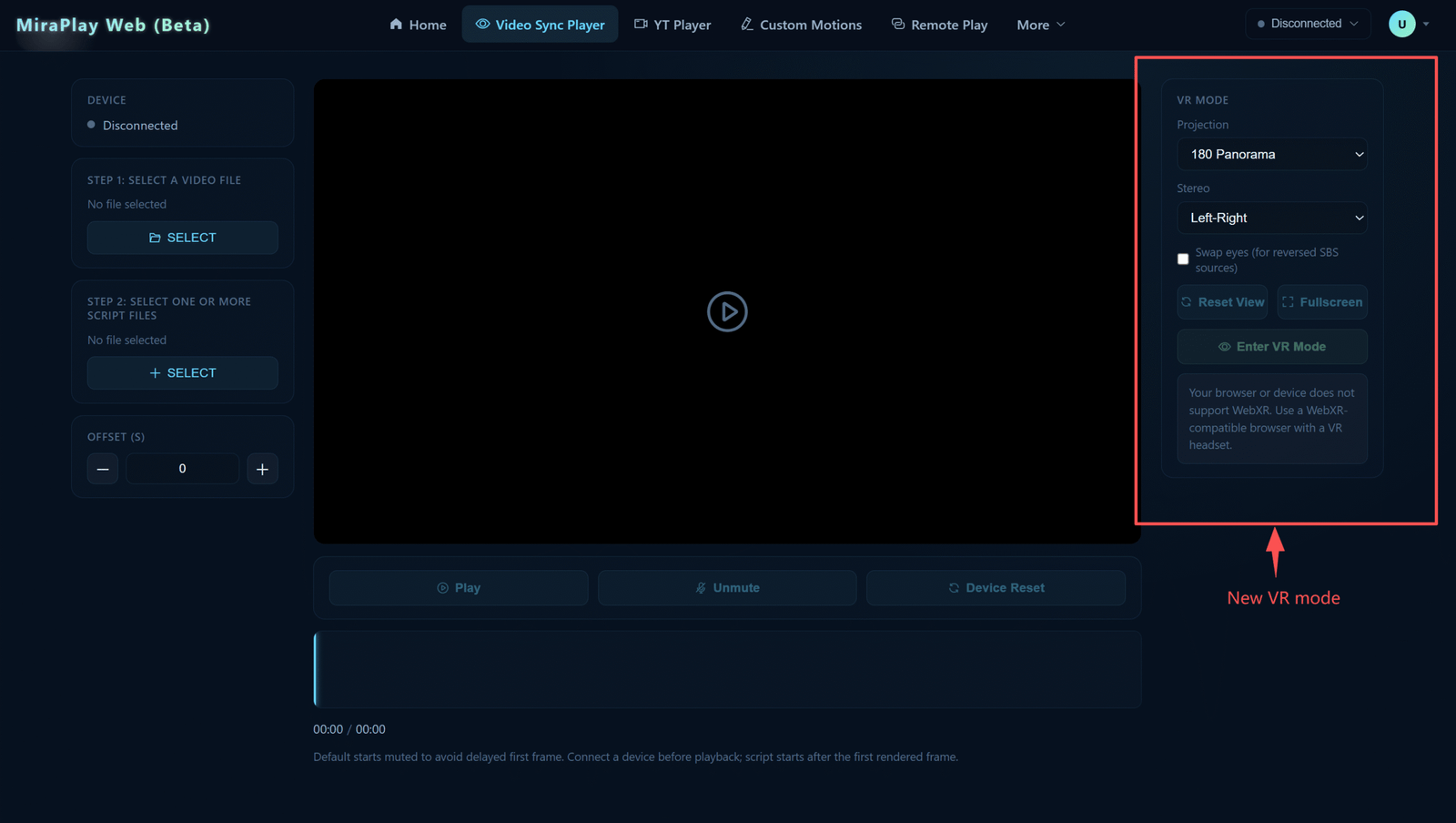
With this mode, users can open MiraPlay Web in a VR browser, such as Quest Browser, select a local VR video and its corresponding funscript file, and enter immersive VR playback.
Supported VR video format options include:
- 180° / 360°
- Left-Right / Top-Bottom
After selecting the video, funscript, and correct VR format, users can click Enter VR Mode to start immersive VR playback with synchronized MiraBot motion.
Device Bridge: Connecting MiraPlay Web and MiraBot Through MiraPlay AiO
In some VR browser environments, direct local connections to devices may be restricted or unreliable.
To make the connection workflow smoother, MiraPlay now supports Device Bridge through MiraPlay AiO v1.7.5 or later.
The basic workflow is:
MiraPlay Web → MiraPlay AiO Device Bridge → MiraBot
MiraPlay Web handles VR video and funscript playback, then sends synchronized motion commands to MiraPlay AiO. MiraPlay AiO forwards those commands to the connected MiraBot device.
To use this workflow:
- Update MiraPlay AiO to v1.7.5 or later
- Enable Device Bridge in MiraPlay AiO
- Sign in to MiraPlay Web and MiraPlay AiO with the same account
- Keep both devices on the same Wi-Fi network
- Connect MiraBot through MiraPlay AiO
When MiraPlay Web and MiraPlay AiO are signed in with the same account, the bridge connection can be handled automatically under that account, with no extra pairing setup required.
Setup Video⇩
We have prepared a short setup video showing the basic workflow:
Better VR Playback Controls in MiraPlay AiO v1.7.5
MiraPlay AiO v1.7.5 also improves its own VR video playback experience, especially for users using a phone-based VR headset.
The update adds a new VR Gaze Menu, allowing users to access key playback controls while wearing a VR headset.
The menu can be shown or hidden by nodding twice in a row.
Current VR Gaze Menu controls include:
- Reset View
- Play / Pause
- Playback progress control
- Video zoom in / zoom out
- IPD adjustment
This makes it easier to control VR video playback without taking the phone out of the headset.
Demo Video⇩
VR Video Zoom Controls
MiraPlay AiO v1.7.5 also adds video zoom in / zoom out controls for VR playback modes.
Users can now adjust the video scale during playback, making it easier to fine-tune the viewing size based on the video format, headset display, and personal preference.
Firmware Version Display
Firmware version information is now displayed in Device Information inside MiraPlay AiO.
This allows users to quickly check the firmware version installed on their MiraBot device without using a separate tool.
A More Complete VR Workflow for MiraBot
This update is another step toward making MiraPlay a more complete VR playback and device control ecosystem.
With MiraPlay Web handling VR browser playback and MiraPlay AiO providing Device Bridge and improved mobile VR controls, MiraBot users now have more flexible ways to enjoy synchronized VR video experiences.