
We are excited to announce the release of MiraBot Firmware 1.3.1.
This update adds on-device storage for motion range limits, improves Wi-Fi compatibility, and enables Wi-Fi setup and wireless mode switching directly through MiraPlay AiO.
Important: Firmware Compatibility
Firmware v1.3.1 is intended for MiraBot S6 and MiraBot Lite only.
It is NOT compatible with MiraBot S6 II. The new MiraBot S6 II uses firmware v2.0.0, specifically developed for its upgraded hardware.
Please verify your device model and make sure you install the correct firmware before updating.
What’s New
1. Axis Range Settings & On-Device Storage
Firmware v1.3.1 adds support for configuring motion range limits through MiraPlay AiO.
After connecting your device to the app, you can independently adjust the minimum and maximum movement limits for each supported axis.
The configured range limits are stored on the device itself, so they remain effective when using other compatible applications, without needing to configure them separately in each app.
2. Wi-Fi Setup & Wireless Mode Switching via MiraPlay AiO
Firmware v1.3.1 adds support for Wi-Fi setup and wireless mode switching directly through MiraPlay AiO.
Default Bluetooth LE Connection: Bluetooth LE is the default connection mode, allowing you to quickly connect your device to MiraPlay AiO without configuring a Wi-Fi network first.
Wi-Fi Setup: You can configure your device’s Wi-Fi network directly through MiraPlay AiO while connected via Bluetooth LE, without needing a computer.
Wireless Mode Switching: Switch between Bluetooth LE, Bluetooth LE (SLR), and Wi-Fi directly from the app. The device saves your selected mode and automatically restarts to apply it.
For step-by-step instructions, see our MiraPlay AiO User Guide.
3. Improved Wi-Fi SSID Compatibility
Firmware v1.3.1 improves compatibility with Wi-Fi network names (SSIDs) containing spaces.
MiraBot S6 and MiraBot Lite now support configuring and connecting to Wi-Fi networks with spaces in their SSIDs.
Note: The devices support 2.4 GHz Wi-Fi networks only.
Why This Update Matters
Firmware v1.3.1 makes device setup and wireless connection management more convenient, reducing the need for a computer while keeping motion range limits consistent across compatible applications.
How to Update
You can update your MiraBot through MiraPlay Web.
After logging in, connect your MiraBot to your computer with a USB cable,open the upper-right menu and go to Firmware Update,and follow the on-screen instructions to update the firmware.
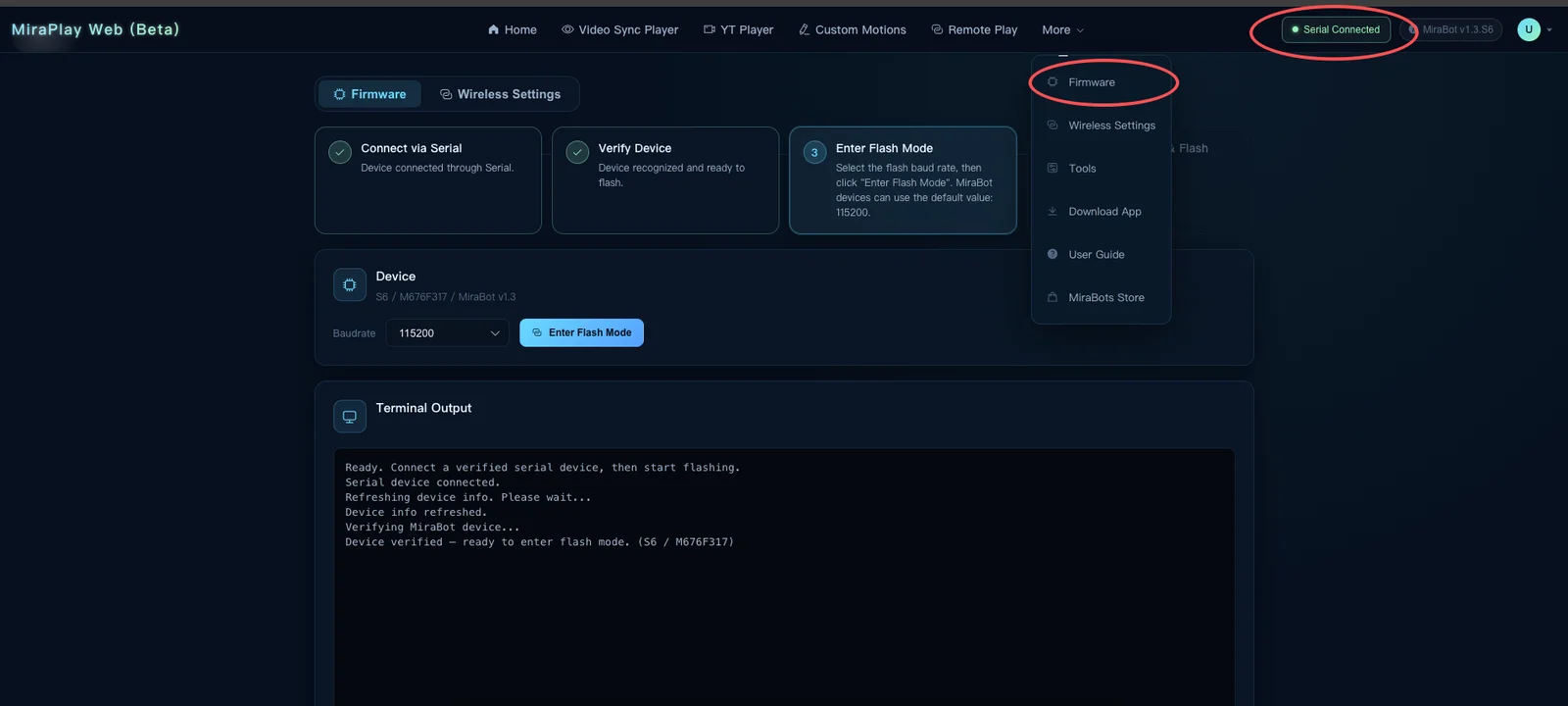
Important: Do not disconnect the USB cable or close or refresh the browser during the firmware update.
For detailed instructions, see our Firmware Update Guide.
FAQ
Q1. Can I install firmware v1.3.1 on MiraBot S6 II?
No. MiraBot S6 II uses firmware v2.0.0, designed for its upgraded hardware. Firmware v1.3.1 is intended for MiraBot S6 and MiraBot Lite only.
Q2. Can MiraBot S6 and MiraBot Lite use the same v1.3.1 firmware file?
No. Although both models share the v1.3.1 version number, they require different firmware builds designed for their respective hardware.
Q3. Do motion range settings remain effective when using other applications?
Yes. Once configured through MiraPlay AiO, the range limits are saved on the device and remain effective when using other compatible applications.
Q4. Can I set up Wi-Fi and switch wireless modes without a computer?
Yes. With firmware v1.3.1, you can configure Wi-Fi settings and switch between supported wireless modes directly through MiraPlay AiO.