
It has been a little over a year since MiraPlay AiO first launched alongside MiraBot.
As more users have started using MiraPlay, we have received a great deal of valuable feedback. During this time, we released several smaller updates and addressed a number of issues. However, as the app continued to grow, some of the early design decisions also began to show their limitations.
There were simply too many areas that could no longer be improved properly through incremental updates alone.
For this reason, about three months ago, we decided to shift most of our development effort away from smaller updates and begin rebuilding MiraPlay AiO as a major new 2.0 version.
Development is still in progress, but we are now confident that MiraPlay AiO 2.0 will be ready within the next few weeks.
Before the official release, we would like to share an early look at some of the new interface designs, workflow improvements, and features coming to MiraPlay AiO 2.0.
1. A Cleaner UI and Easier Everyday Use
One of the main goals of MiraPlay AiO 2.0 is to make the app easier, faster, and more intuitive to use.
We have redesigned the interface with a cleaner and more consistent visual style, while also reworking a number of interactions that previously required too many steps.
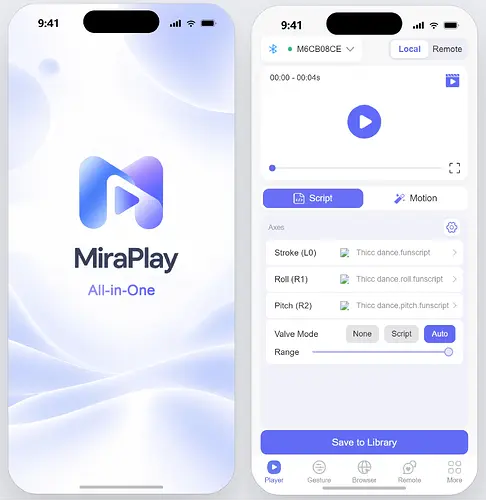
Some of the key improvements include:
- A completely redesigned UI with a cleaner and more consistent layout.
- No forced login for offline features. Functions that do not require online services can be used without signing in.
- Automatic device reconnection. Once a device has been set up, MiraPlay can reconnect automatically when the device becomes available again, without requiring the user to repeat the connection process.
- Improved device setup tools, including graphical Arm calibration, easier access to device information, and one-tap switching between supported Wi-Fi / Bluetooth / SLR-compatible modes.
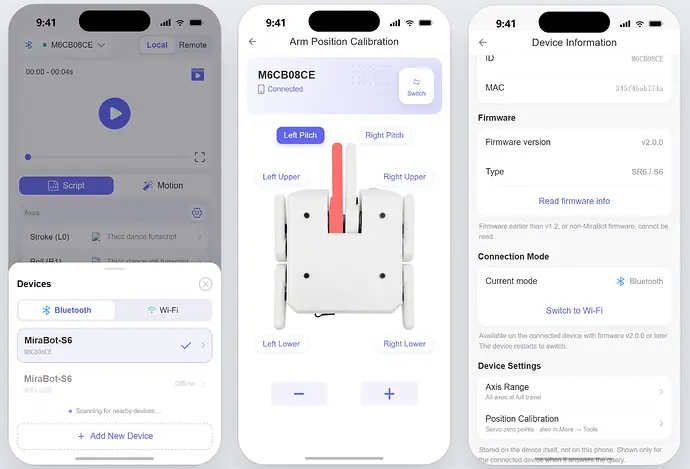
The goal is simple: reduce the amount of setup users need to think about and make it faster to start using the device.
2. Keeping What Makes MiraPlay Different — and Expanding It
The features that have made MiraPlay AiO useful to many users will continue to be supported and improved.
These include:
- VR video playback
- Gesture Sync
- Script recording
- Multi-axis playback and control
- Local video and script playback
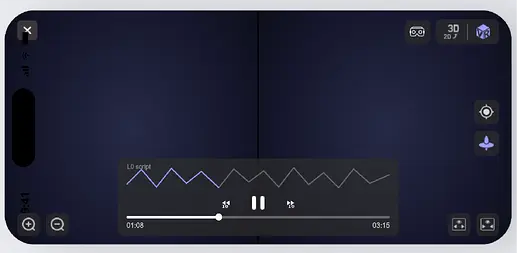
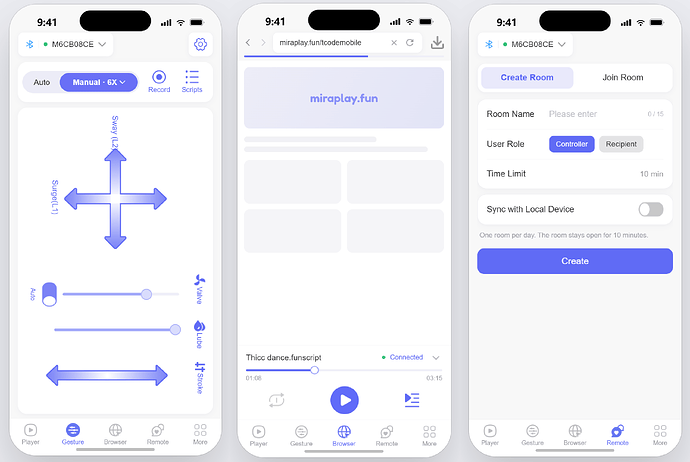
At the same time, MiraPlay AiO 2.0 introduces several new capabilities.
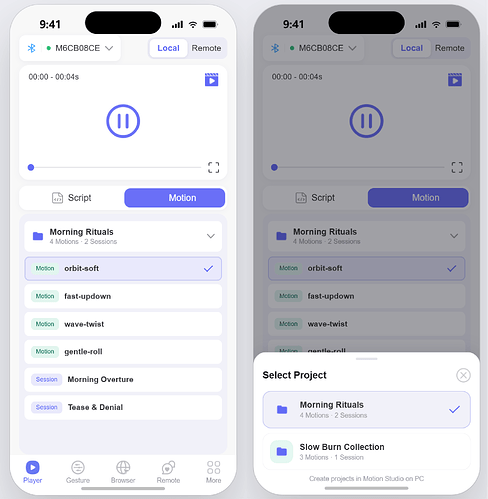
Motion Studio Motion Support
Motions created in or downloaded through MiraBot Motion Studio can be referenced directly inside MiraPlay and used together with video playback.
This provides another option beyond traditional Funscript playback, especially for reusable or parameter-based multi-axis motions.
Remote Playback with DeoVR and HereSphere
We are also adding a new Remote Play workflow for VR users.
MiraPlay can handle Funscript playback and device control on the phone while video playback runs separately inside DeoVR or HereSphere on a VR headset.
The basic concept is similar to the PC-based MultiFunPlayer workflow, but designed around a mobile setup.
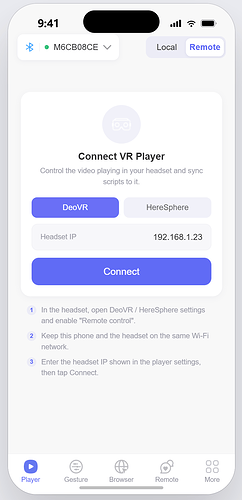
This feature is still undergoing testing and refinement, and we will share more details as it gets closer to release.
3. Built for What Comes Next
MiraPlay AiO 2.0 is also being rebuilt with future expansion in mind.
We plan to continue supporting DIY and OSR-based devices while developing deeper integration across the wider MiraBot ecosystem — including hardware, firmware, accessories, and software.
Future directions include:
- Better support for additional device functions and expansion modules
- More flexible motion and device controls
- New ways to use MiraBot remotely
- Deeper integration between MiraPlay and Motion Studio
We are also exploring a more open remote interaction system that could make it easier for users to connect and interact over the internet.
These are longer-term development directions rather than commitments for the initial 2.0 release, but the new architecture is being designed to give us much more room to expand MiraPlay in the future.
User feedback remains an important part of this process. Many of the improvements in MiraPlay AiO 2.0 began with real feedback from users, and we will continue listening to suggestions as development progresses.
Still Free for OSR Users
The new MiraPlay AiO will continue to be free to use for OSR users.
Compatible OSR/TCode devices can connect directly through Wi-Fi (UDP) without requiring special MiraBot firmware.
One of the original goals of MiraPlay has always been to make multi-axis devices easier to get into, without requiring new users to first learn a collection of PC applications, bridges, and complicated setup procedures.
That goal has not changed.
At the same time, MiraPlay will continue to be developed closely alongside the MiraBot ecosystem so that MiraBot hardware, firmware, accessories, and software can work together as smoothly as possible.
Over the next few weeks, we will continue sharing more previews, screenshots, and feature details as MiraPlay AiO 2.0 moves closer to release.